Set up offers and a discount code
After this article Joep mentions your offers on the phone and prices them on the order, with or without a discount code.
What you need
- A menu that is live, if you want to put an offer on a dish.
- What the offer is: a percentage, an amount or an offer price, and on which days it runs.
- For a discount code: the code, the percentage and the first and the last day.
How long it takes: 10 minutes
Steps
Open My Joep and go to Offers.
The page has three blocks: “Offers on dishes”, “Other offers” and “Discount code”. You use only what you need.
Put an offer on one dish on the menu, on the dish itself.
Click “Go to the menu”. On the dish, choose the kind of offer, such as “Offer price” or “Percentage off”, fill in the number and click “Save” there. With “Buy some, get some free” you make 1+1 free, for example.
Click “Add an offer” for an offer on the whole order.
You do that in the block “Other offers”. When more than one runs at once, the best one counts. The discount code comes off after it, the delivery fee never. You can have at most 10 of these offers.

Fill in the name, the discount and the conditions of the offer.
“Name on the receipt” is what the offer is called. At “Kind of discount” you choose a percentage or a fixed amount. With “On which days” and “Applies to” you decide when the offer counts. Leave “From an amount” empty and it applies to any amount.
Choose the moment under “When does Joep mention an offer?”.
With “When reading the order back” Joep names the offers that apply to the order at the end, in one sentence. With “While ordering” he says so briefly as soon as the caller orders something with an offer. If a caller asks about offers, Joep always names them.
Click “Save” under the block “Other offers”.
Every block has its own “Save” button. You see “Saved. Joep uses this from the next call.”
Fill in the code and the percentage in the block “Discount code” for a discount code.
The code is 3 to 20 letters and digits, such as WELCOME10. A code that is easy to say works best on the phone. At “Discount” you fill in a percentage between 1 and 90.
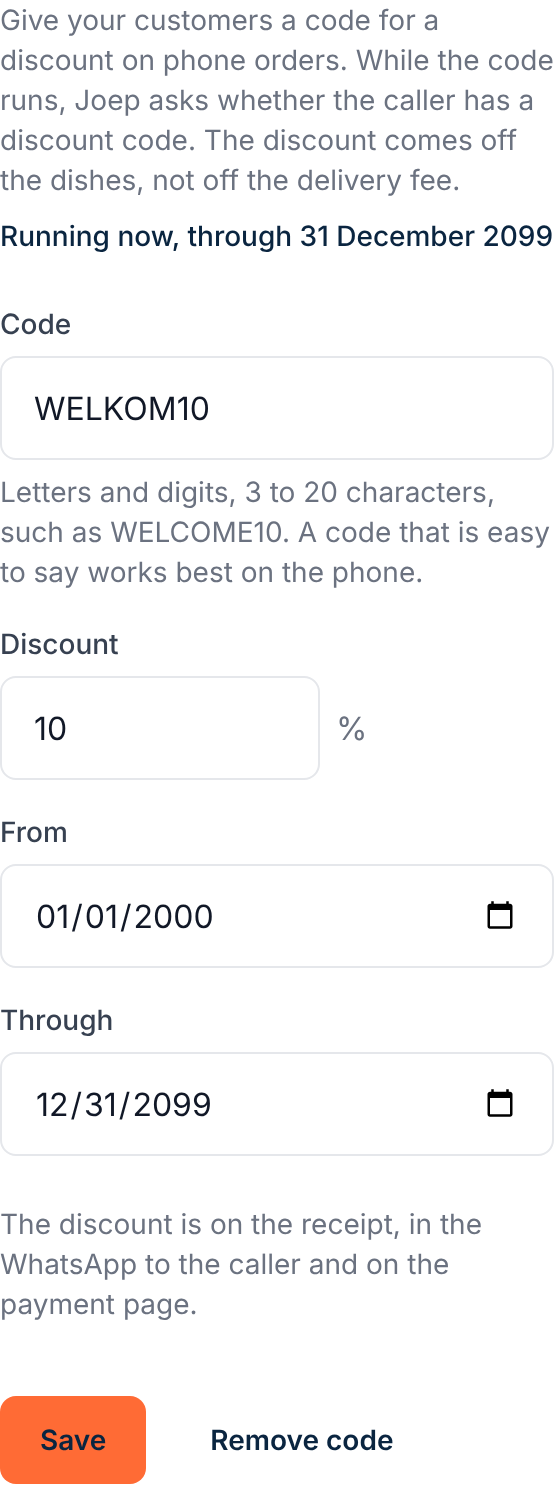
Choose the days the code is valid at “From” and “Through”.
While the code runs, Joep asks whether the caller has a discount code. He never names the code himself. The discount comes off the dishes, not off the delivery fee.
Click “Save” under the discount code.
You stop the code with “Remove code”. From the next call on, Joep no longer asks for it.
How to tell it worked
Under an offer on the whole order there is a line that starts with “Joep says:”, with the name and the discount. The block “Discount code” says “Running now” with the last day. Joep prices offers and the discount code himself: the discount is on the receipt and in the WhatsApp to the caller.
Not working?
You uploaded a new menu and the offers on your dishes are gone.
A new menu starts without offers on dishes. Set them again on the menu, on the dish. Your other offers and your discount code stay as they are.
Joep does not give a caller the discount of the discount code.
Joep only applies the discount when the caller says the code. Also look in the block “Discount code” at what it says above the fields. If the code has ended or has yet to start, change the dates and click “Save”.
Saving does not work for an offer on the whole order.
Give the offer a name of at most 60 characters, pick at least one day and fill in a percentage between 1 and 90, or an amount such as 2.50.
Related articles
Updated on