Set your delivery area, fee and minimum
After this article Joep knows whether you deliver, where you deliver, what it costs and from which amount.
What you need
- The postcodes you deliver to, or the number of kilometres around your business.
- Your delivery fee, your minimum order and how long delivery takes.
How long it takes: 5 minutes
Steps
Open My Joep and go to Delivery.
Choose “Yes, pickup and delivery” under “Do you deliver orders?”.
If you do not deliver, choose “No, pickup only” and go on to the last step. Joep then only takes orders for pickup.
Choose “By postcode” or “Within a radius” under “Where do you deliver?”.
By postcode, Joep asks the caller for their postcode. Within a radius, he asks for the address and looks it up through Google Maps.
Fill in your postcodes or your radius.
Under “Postcodes you deliver to” you fill in just the four digits, at “From” and “Up to and including”. For a single postcode you fill in only “From”, and “Add postcodes” gives you another row. At “Radius” you fill in a number of kilometres between 0.5 and 50, as the crow flies from your business.
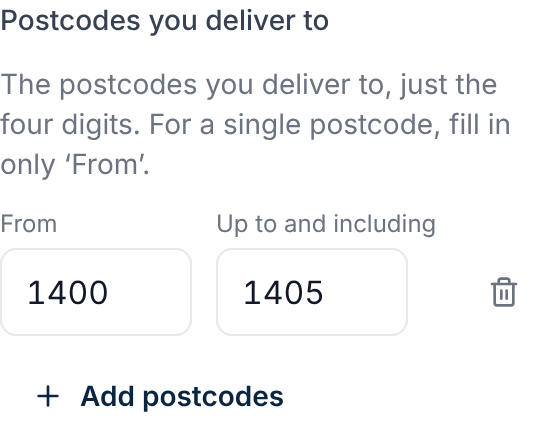
Fill in a minimum and delivery fee of its own at a postcode where they differ.
Each row also has “Minimum” and “Delivery fee”; empty means the amounts below. Do you have a list, such as “6511 € 18.00 € 2.49” per postcode? Choose “Paste a list”, paste it and click “Use this list”. Postcodes in a row with the same amounts become one row. A postcode in two rows takes the smaller one.
Fill in what delivery costs at “Delivery fee per order”.
Fill in 0 if delivery is always free. If you deliver for free from an amount, fill that in at “Free delivery from”. From that amount on Joep charges no delivery fee, and he only says so when the caller asks about the delivery fee.
Fill in at “Minimum order” from which amount you deliver.
The amount counts without the delivery fee. Fill in 0 for no minimum. If an order stays below it, Joep asks whether the caller wants to add something or comes to pick it up.
Fill in at “Delivery time” how many minutes delivery takes.
This is the time Joep tells the caller.
Click “Save”.
You see “Saved. Joep uses this from the next call.”
How to tell it worked
After saving it says “Saved. Joep uses this from the next call.” Then call your Joep number and ask whether you deliver to an address in your area. Joep then names the delivery fee, the minimum and the delivery time, for the caller’s postcode.
Not working?
Saving does not work and there is a red message at the postcodes.
Fill in four-digit postcodes, without letters. “Up to and including” may not be lower than “From”. At “Minimum” and “Delivery fee” fill in an amount, such as 2.50, or nothing. Remove an empty row with the bin behind it.
With a radius it says we cannot find your business on the map.
Then choose “By postcode” and fill in your postcodes, or email support@joep.ai.
Joep tells a caller you do not deliver to an address you do go to.
That address is then outside your postcodes or your radius. Add the postcode or make the radius larger, and click “Save”. If you saved “No, pickup only” before, fill in your postcodes or your radius again.
Related articles
Updated on