Put choices and extras on your menu
After this article you know how sizes, choices and extras appear on your menu and how you add or change them.
What you need
- Your menu, with the sizes, the choice and the extras of each dish, and their prices.
- A menu that is already live in My Joep, to see how it looks now.
How long it takes: 10 minutes
Steps
Open My Joep and go to Menu.
The block “How Joep knows your menu” shows what Joep knows about each dish.
Look at a dish to see how its sizes, its choice and its extras are shown.
A size, such as small and large, is a line under the dish with its own price. The choice starts with “Choice of”, followed by the options. If an option costs more, the surcharge is in brackets behind it. The extras come after “Extra”, each with its price.
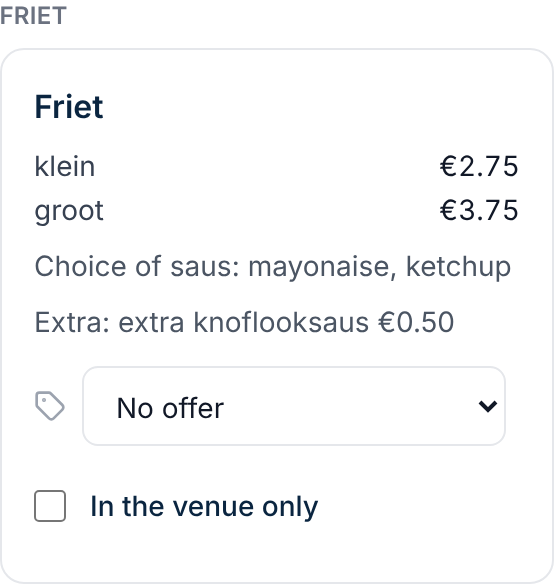
Write the sizes, the choice and the extras next to the dish in your own menu, with their prices.
A size gets its full price, such as small 3.00 and large 4.00. An extra gets the price that comes on top, such as mayonnaise 0.75. If the customer has to pick something that is included in the price, such as a sauce, write down the options. Joep knows one choice per dish.
Upload your updated menu under “Upload a new menu” with the “Upload” button.
You cannot change single choices or extras in My Joep: you upload the whole menu again. If you upload an export from your till, an option group that is required becomes the choice of the dish, and the other options become extras.
Wait until the label “Live” shows under “Current menu” again.
Until then Joep uses the old menu. If it says “Being reviewed”, we check the menu first and put it live afterwards.
Check on the dish that the sizes, the choice and the extras are right.
On the phone Joep does not take a dish with sizes without a size, and he always asks for the choice before he confirms the order. He adds the price of an extra to the dish.
How to tell it worked
In “How Joep knows your menu” the dish shows its sizes with their price, the line with “Choice of” and the line with “Extra”. Call your Joep number and ask about the dish to hear what Joep says about it.
Not working?
A choice is listed after “Extra” instead of after “Choice of”.
Joep knows one choice per dish: something of which the customer has to pick exactly one option. Write clearly next to the dish in your menu that the customer has to choose, with the options, and upload the menu again. In an export from your till a second required group goes with the extras.
A size or a dish says “no price”.
Joep then cannot take the dish in an order. Put the full price next to every size in your menu and upload the menu again.
Your change is not in “How Joep knows your menu” yet.
Until the new menu is live, Joep uses the old one. Look under “Your menu” to see whether your upload is still being processed or reviewed.
Related articles
Updated on