Fill in your billing details
After this article your billing details are in My Joep, you have chosen your billing period and you know where your invoices are.
What you need
- The name and address your invoice has to carry, such as your company or your sole trader business.
- Your VAT number, if you want it on your invoice.
How long it takes: 5 minutes
Steps
Open My Joep and go to Subscription.
The top of the page says where you stand now, for instance until when your trial runs. If you fill in no billing details, we pause Joep after the trial. No invoice ever comes unless you chose it yourself.
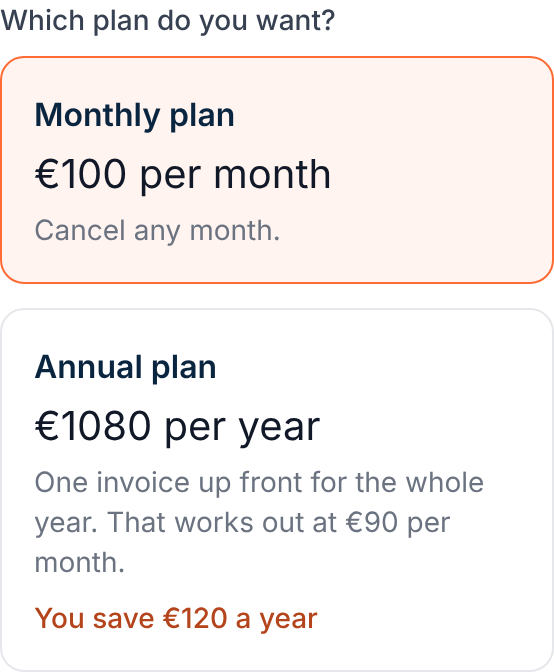
Under “Choose your subscription”, pick your billing period: “Per month” or “Per year”.
Under “How do you want to pay?” each billing period shows the price of your plan. You can cancel per month any month. Per year you get one invoice up front for the whole year.
Enter the company name and the address under “Billing details”.
These are the details of who pays. They may differ from your business details. You always fill in the company name, street and number, postcode and town, and you choose the Netherlands or Belgium.
Enter your VAT number if you want it on your invoice.
This field may stay empty, and so may “Email address for invoices” and “Your own reference”. If you leave the email address empty, the invoice goes to the address of your account.
Click “Start subscription”.
If your trial is still running, it simply runs on until the date shown on the page. After that your subscription starts and you get your first invoice by email, with a payment link.
Find your invoices under “Invoices”.
Each invoice shows the amount and whether it is open or paid. “View” opens the invoice, “Pay” pays an open invoice. You see the latest 24 invoices here.
Switch your billing period later under “Billing period”, with the button “Choose”.
If you move to per year, you pay for the year up front. Want to pay per month after your year? Get in touch with us. You change your details under “Billing details”, with “Save”.
How to tell it worked
The top of the page says which subscription is running, or which one starts after your trial. Under “Billing period” it says “Current” on what you chose, and your details are under “Billing details”.
Not working?
After saving, the page says your subscription is not running yet.
Your details have been kept. If Joep already answers for you, click “Start subscription”. If he does not answer yet, your subscription starts by itself as soon as he does.
Your VAT number is not accepted.
A Dutch VAT number looks like NL123456789B01, a Belgian one like BE0123456789. Also check that the right country is chosen. You may leave the field empty.
You are looking for an older invoice, or you have a question about an invoice.
The page shows the latest 24 invoices, and you also got every invoice by email. For an older invoice or a question, email support@joep.ai.
Related articles
Updated on