Logo, colours and photos of your ordering site
After this article your ordering site has your own logo, your own photo and your own colours.
What you need
- Your logo as a png, jpg or webp: at most 2 MB and at least 200 by 200 pixels.
- A landscape photo of your venue or your food: at most 5 MB and at least 1200 pixels wide.
- If you have one: the colour code of your house style.
How long it takes: 10 minutes
Steps
Open My Joep and go to Ordering site.
Scroll to the block “Appearance”. Under the heading “Preview” is your real site with your own menu: after saving you see there what you changed.
Click “Upload logo” at “Logo” and choose your logo.
The logo is saved at once. Without a logo your name stands as the wordmark.
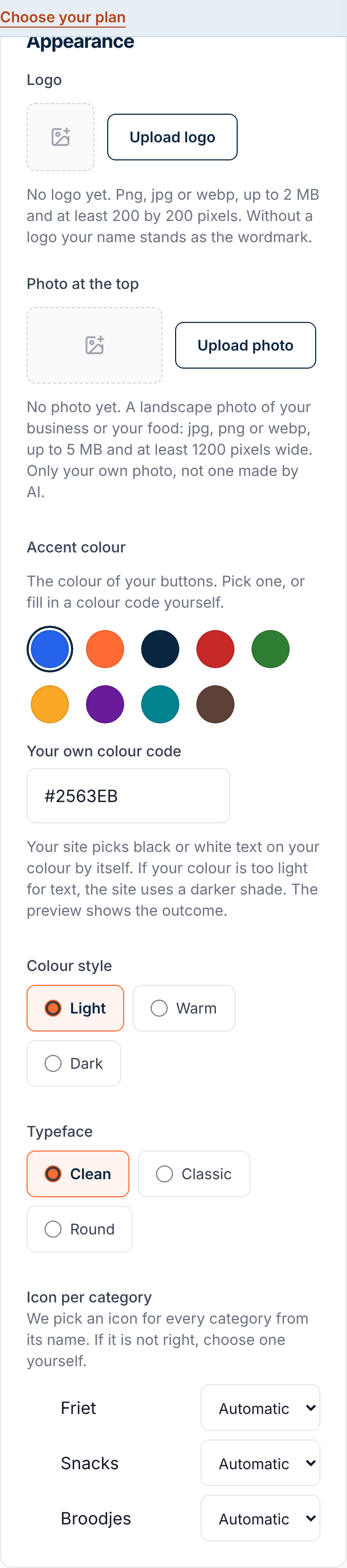
Click “Upload photo” at “Photo at the top” and choose a landscape photo.
The photo is saved at once as well. Only use your own photo, not one made by AI.
Choose the colour of your buttons at “Accent colour”.
Pick one of the nine colours, or fill in a code yourself at “Your own colour code”, such as #FF6B35. If your colour is too light for text, your site uses a darker shade.
Choose a “Colour style” and a “Typeface”.
The colour style is light, warm or dark. The typeface is clean, classic or round.
Click Save.
The button is at the bottom of the form. Within a minute it is on your site, and the preview shows it at once.
Add a photo on the Menu page to the dishes you want to show.
You do that per dish, in the same place as the labels and the allergens. A dish without a photo is on your site without one.
How to tell it worked
Under “Preview” you see your logo, your photo and your colour. If your site is live, your customers see them within a minute.
Not working?
Your logo or your photo is refused.
Check the size. A logo is at most 2 MB and at least 200 by 200 pixels. A photo is at most 5 MB, landscape and at least 1200 pixels wide.
The colour on your site is darker than the one you chose.
We do that when your buttons would not be readable otherwise. Your site picks black or white text on your colour by itself: the preview shows the outcome.
A logo or photo you changed was taken off your site.
A logo or photo you change while your site is live is looked at afterwards. If we take something off, the email says why. Upload another logo or another photo after that.
Related articles
Updated on